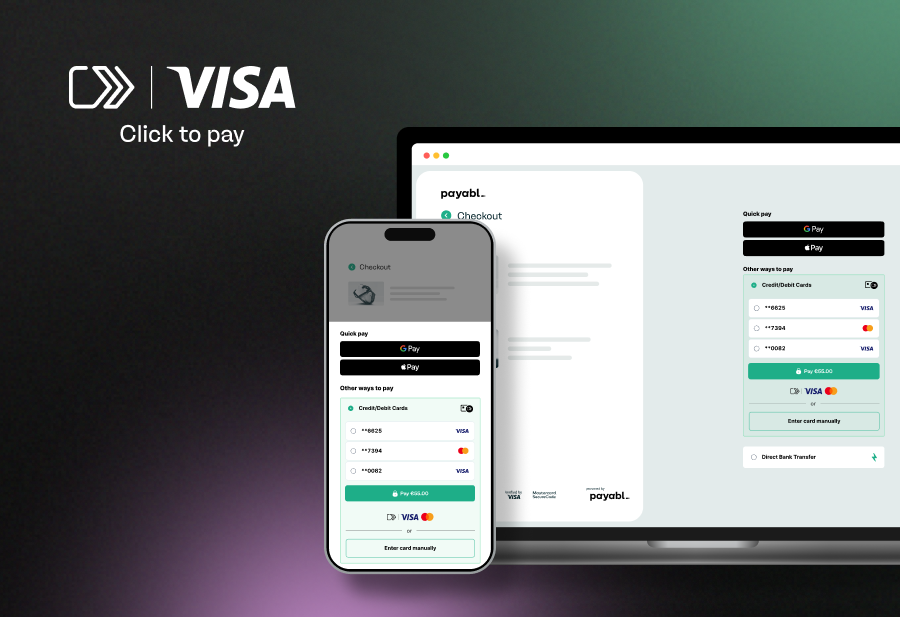
Online checkout friction costs retailers billions in lost revenue annually. Consumers abandon carts when faced with lengthy form fields, security concerns, or checkout processes that require creating yet another account. Visa Click to Pay addresses these pain points by enabling secure, streamlined transactions across participating merchants without repetitive data entry.
This standardised payment solution represents a shift in how card networks approach ecommerce, prioritising both conversion and security through tokenisation. For merchants and consumers in the UK and globally, understanding Click to Pay's functionality and implementation becomes increasingly relevant as adoption accelerates.
What is Visa Click to Pay?
Visa Click to Pay is a simple and more secure digital checkout experience that brings the convenience of contactless payments online. It allows consumers to make payments using their stored card credentials on participating merchant websites and apps. Rather than entering card details manually for each transaction, users can authenticate once and access their stored payment information through a single profile, managed by Visa.
When a consumer enrolls their Visa card, their payment credentials are tokenised and stored securely, allowing for one-click authentication at checkout. The service utilises EMV Secure Remote Commerce (SRC) specifications, an industry standard developed by EMVCo that enables consistent checkout experiences across different card networks.
Differences with traditional checkout
Traditional online checkout requires consumers to manually enter information like card numbers, expiration dates, CVV codes, and billing addresses for each purchase. This process typically involves multiple form fields, and increases the likelihood of input errors and cart abandonment.
Click to Pay eliminates this repetitive data entry by:
- Storing encrypted payment credentials in a secure digital profile
- Recognising enrolled users across participating merchants
- Enabling authentication through biometrics, device recognition, or one-time passcodes
- Automatically populating payment information at checkout
- Reducing checkout time from minutes to secondsHow Visa Click to Pay works
Tokenisation & secure checkout
Click to Pay uses tokenisation to help protect sensitive card data during transactions. When a consumer enrolls a card, the actual Primary Account Number (PAN), (more commonly known as the card number), is replaced with a unique digital token. This token serves as a surrogate value that merchants and payment processors use to complete transactions without accessing or storing the real card number.
During online checkout, the tokenised credentials are transmitted along with cryptographic verification, ensuring that even if data is intercepted, it cannot be used for fraudulent purposes. Each token is specific to the merchant or transaction taking place, adding an additional security layer beyond traditional card payments.
Account setup & stored credentials
Consumers can enroll in Click to Pay either through their card issuer's banking portal or during the online process checkout at a participating merchant. The enrollment process requires:
- Entering the Visa card details to be stored
- Verifying user identity through issuer authentication
- Creating authentication preferences (biometric, PIN, or OTP)
- Optionally adding additional cards and shipping addresses
Once enrolled, the profile becomes accessible across all merchants that support Click to Pay. The system recognises users through their email address or mobile number, and automatically presents stored payment options when they reach checkout.
Supported devices & platforms
Click to Pay can be used on mobile and desktop browsers, and in-app environments. Click to Pay can be authorised via a one-time password (OTP) on desktop and mobile.
Integration occurs at the merchant level through payment service providers and gateway partners, while retailers can implement the Click to Pay button alongside existing payment options, allowing consumers to choose their preferred method at checkout.
| Step | Traditional checkout | Visa Click to Pay |
| 1 | Navigate to checkout | Navigate to checkout |
| 2 | Enter card number | Click "Click to Pay" button |
| 3 | Enter expiration date and CVV | Authenticate (biometric/OTP) |
| 4 | Enter billing address | Review pre-filled information |
| 5 | Enter shipping address | Confirm payment |
| 6 | Review and confirm | Complete transaction |
| 7 | Complete payment |
Benefits of Visa Click to Pay
Faster checkout, higher conversions
Click to Pay reduces online checkout time by eliminating manual data entry. This process directly impacts conversion rates, as consumers complete purchases before decision fatigue or distractions can impact the purchase. Plus, the recognition technology identifies enrolled users immediately, presenting stored credentials without requiring login to a merchant-specific account.
Pilot data from Visa reveals that Click to Pay can reduce up to 20 seconds off the checkout process when compared to entering card details manually. This saved time can equate to a revenue increase up to 30%, thanks to fewer abandoned baskets and reduced friction at payment.
Reduced cart abandonment
Cart abandonment rates correlate strongly with checkout complexity. By minimising required actions and form fields, Click to Pay addresses primary abandonment triggers, including lengthy processes, concerns about creating accounts, and uncertainty about security.
Enhanced security
The tokenisation infrastructure ensures that merchants never handle actual card numbers, reducing PCI DSS compliance scope and liability exposure. Multi-factor authentication requirements and cryptographic verification add layers beyond traditional card-not-present transactions. Consumers benefit from consistent security standards across merchants without managing separate credentials for each retailer.
Consistent UX across merchants
Unlike other guest checkout solutions that vary by retailer, Click to Pay delivers a uniform experience. Consumers encounter the same authentication flow and interface regardless of where they shop, reducing confusion and boost customer satisfaction rates.
Device recognition and biometric authentication
Modern authentication methods including fingerprint scanning, facial recognition, and device-based validation create frictionless security. These methods prove both more secure and more convenient than password-based systems, particularly on mobile devices where biometric methods are standard.
Cross-border compatibility
The EMV SRC standard enables Click to Pay functionality across local and international markets without requiring consumers to manage multiple regional payment profiles. A single enrollment supports transactions in different currencies and jurisdictions, improving cross-border commerce.
See how payabl. integrates Click to Pay for seamless online checkout.
Why is Visa Click to Pay safer?
Security features explained
Click to Pay incorporates multiple security mechanisms that improve on traditional card-not-present transaction protection:
Tokenisation replaces card numbers with unique identifiers that cannot be reverse-engineered or reused if compromised. Each token is domain-restricted, functioning only for its designated merchant.
Multi-factor authentication requires consumers to verify their identity through something they know (password, PIN), something they have (mobile device, OTP), or something they are (biometric data). This verification occurs before payment credentials are released.
EMV 3-D Secure integration provides additional cardholder authentication for transactions that require more verification. This protocol enables issuers to assess transaction risk better, and request additional authentication when needed.
Consumer & merchant protections
Consumers retain standard Visa Zero Liability protection, ensuring they are not held responsible for unauthorised transactions when proper security protocols are followed. The tokenisation layer also provides additional defense, as compromised tokens cannot be used outside their designated context.
Merchants benefit from reduced fraud liability and chargebacks when transactions are properly authenticated through Click to Pay. The shift of authentication responsibility to the card network and issuer, combined with strong customer authentication, reduces merchant exposure to fraud losses.
Advantages:
- Payment credentials are never exposed to merchants
- OTP authentication for additional security
- Tokenisation prevents credential theft and reuse
- Consistent security standards across merchants
- Reduced PCI DSS compliance burden
Considerations:
- Requires initial enrollment process
- Limited to participating merchants
- Authentication requirements may add steps for new devices
- Relies on secure email or mobile number
Future of Visa Click to Pay & Digital Payments
Trends in one-click payments
The ecommerce landscape continues shifting toward frictionless payment experiences. Click to Pay represents a response to solutions like Apple Pay and PayPal, which offer similar methods of one-click, pre-authorised transactions. As consumer expectations evolve around checkout simplicity, the adoption of streamlined payment methods such as one-click could become a competitive necessity, rather than differentiation.
Open banking initiatives and account-to-account payment rails also present complementary and competitive forces. While these systems enable direct bank transfers without card networks, the established infrastructure and familiar trust signals of card-based payments provide Click to Pay with near-term advantages in consumer and merchant adoption.
Adoption forecast
Visa has already reported strong early results from Click to Pay implementations:
- 11% increase in authorisation rates vs. manual card entry
- 17% reduction in cart abandonment due to simplified online checkout
- +35K merchants currently live with Click to Pay in Europe
- 34 European markets where Click to Pay is active
In a recent webinar about Visa Click to Pay, Nabil Manji, SVP strategic innovation, Worldpay expanded on its potential to change the industry.
“Click to Pay is the new standard that’s going to revolutionise online shopping for consumers. It makes the journey and experience much more effortless by removing the need for them to input their card number. In the same way we’ve seen contactless payments change in-person payments, we’re expecting Click to Pay to have a similar impact for online transactions,” he said.
“For instance, merchants are really struggling with issues such as card abandonment and high fraud rates, and the features associated with Click to Pay such as biometric verification and passkeys solve some of the key challenges. Click to Pay is a catalyst for a new era of online shopping.”
Conclusion
Visa Click to Pay addresses fundamental ecommerce challenges through standardised, secure checkout experiences. The combination of tokenisation, biometric authentication, and stored credentials delivers measurable benefits in conversion optimisation and security for both merchants and consumers.
As digital commerce continues expanding and consumer expectations around payment convenience broaden, solutions that balance security with simplicity become essential to merchants and their checkout flows.
Implementation considerations vary by the merchant’s technical infrastructure, needs and payment service provider capabilities. Organisations considering a Click to Pay option should assess integration requirements, consumer demographics, and expected ROI based on current checkout performance metrics.
FAQs about Visa Click to Pay
How does Visa Click to Pay work?
Visa Click to Pay stores your encrypted card details in a secure digital profile after one-time enrollment, replacing your actual card number with a unique token. When you check out at participating merchants, authenticate using biometrics or a passcode and your payment information from saved cards is automatically populated.
Why is Visa Click to Pay more secure?
Click to Pay uses tokenisation to replace your card number with unique identifiers that are more resilient to fraud, plus multi-factor authentication such as biometrics or one-time passcodes. You're also protected by Visa Zero Liability, meaning you're not responsible for unauthorised transactions when the proper security protocols are followed.
What's the difference between Visa Click to Pay and traditional checkout?
Traditional online checkout requires manually entering your card number, expiration date, CVV, and billing address for every purchase. Click to Pay eliminates this repetitive data entry by recognising your information across multiple merchants, and auto-filling your stored credentials after a single authentication steps.
Do I need to enroll separately at each merchant for Click to Pay?
No, you only need to enroll once through your card issuer or at any participating merchant. Your Click to Pay profile then works across all merchants that support the service, providing a consistent checkout experience regardless of where you shop.