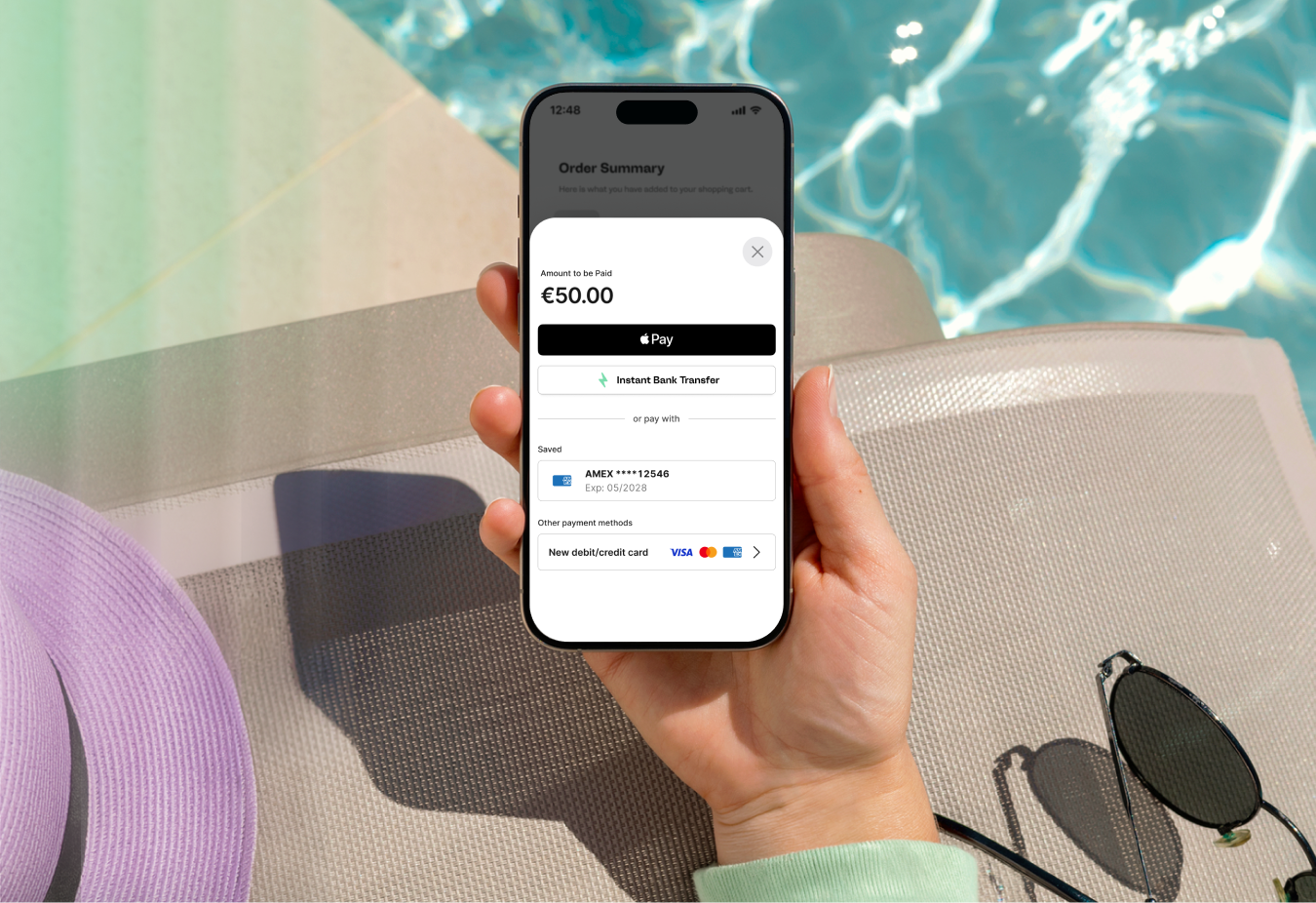
Approximately three-quarters of ecommerce traffic now comes from mobile devices, with a growing share of that traffic happening inside apps rather than mobile browsers. For merchants building on iOS or Android, the payment step is where revenue is won or lost. Global cart abandonment sat above 70% in 2025. A poor checkout experience is one of the biggest reasons users drop off before completing a purchase.
In-app payments let users go from browsing to buying without leaving the app.This guide covers what in-app payments are, how they work, the benefits for merchants and end users, security requirements, and what to look for in a provider.
What are in-app payments?
In-app payments are transactions completed inside a merchant’s native mobile app. They use a checkout that runs within the merchant's own environment rather than a browser redirect. The user selects a product or service, pays and confirms the transaction on the same screen they were already on.
The app uses a mobile SDK provided by a payment provider to collect payment details, encrypt them, and pass them to the acquirer for authorisation.
Common payment methods include Apple Pay, Google Pay, card payments (Visa, Mastercard, Amex), and instant bank transfers.
In-app payments cover transactions that occur outside app store rails, digital assets in regulated categories, and any purchase processed through a third-party payment provider.
In-app purchases refer specifically to digital goods bought through Apple's App Store or Google Play billing, where the platform takes a commission.
Apple and Google require apps to use native billing systems for digital goods used inside the app. These include subscriptions, in-game currencies, premium content unlocks,and full-version upgrades. Both platforms take a commission: 30% at the standard rate, or 15% for developers earning under $1 million annually through their respective Small Business Programs.
How do in-app payments work?
An in-app payment moves through the same stages as any card-not-present transaction. The mobile SDK handles sensitive details in the app so the user never leaves. A mobile SDK , or Software Development Kit, is a toolkit containing pre-built code, tools, and documents that developers use to build mobile apps.
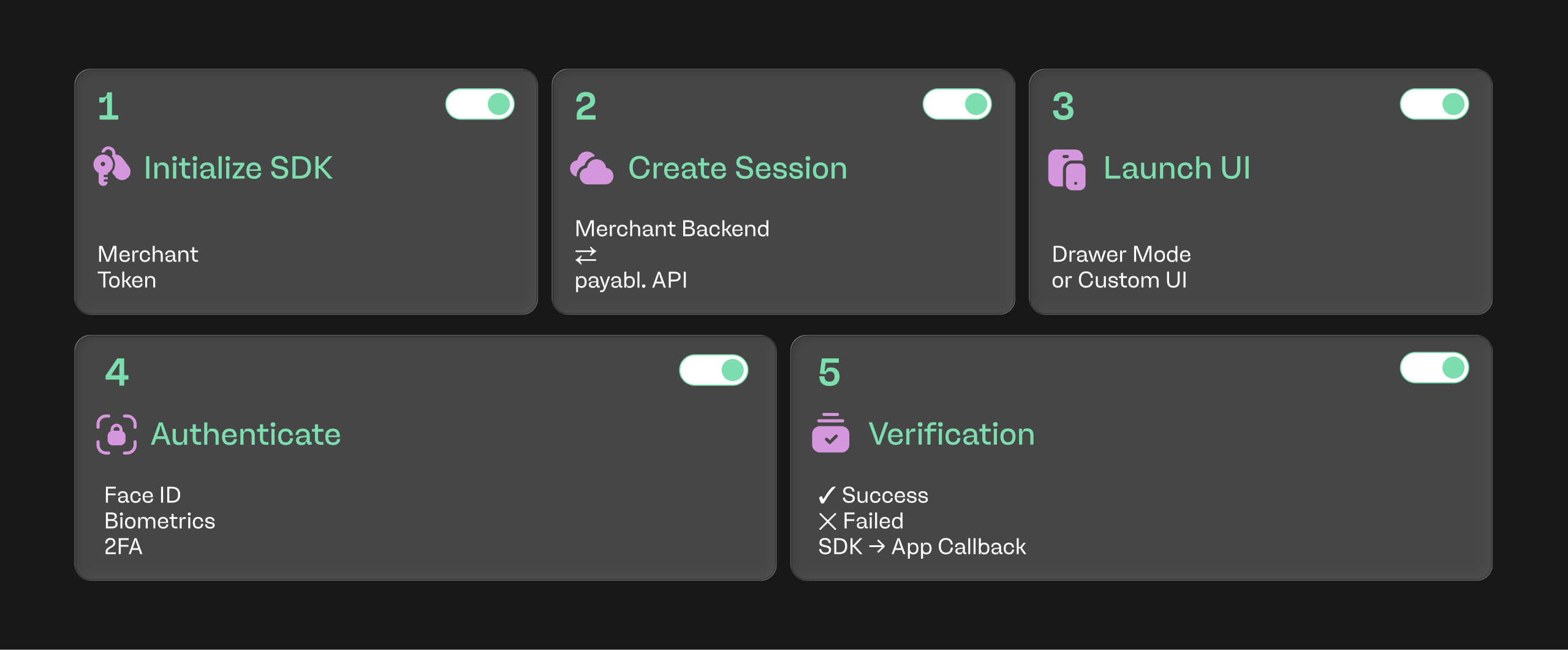
The transaction flow:
- Initialization: the app initializes the SDK with a merchant token.
- Session creation: the merchant's backend requests a payment session from payabl.
- UI trigger: the app invokes "Drawer Mode" or a custom UI.
- Transaction: the user authenticates with biometrics, 2FA etc.
- Verification: the SDK receives the result and notifies the app to show a success/fail screen.
Types of in-app payments
In-app payments split into a few categories.
Drop in option
Get drop in buttons for Apple Pay, Google Pay, Instant Bank Transfer, card payments such as Amex, Visa or Mastercard.
Hosted Drawer mode
This provides the entire checkout UI, pre-built and designed. This is the ‘ready to go’ option.
Mix and match
Combine both options to meet your requirements.
Benefits of in-app payments
The reasons merchants add native checkout to their ecosystem are more commercial than technical.
Higher conversion rates
Every extra step in a checkout affects conversion rates. Redirecting a user to a browser breaks the flow, sometimes requires re-authentication, and gives the user a moment to reconsider. Keeping the checkout in-app removes those drop-off points and lifts completion rates.
Faster checkout with wallets
Apple Pay and Google Pay reduce card payment to a single biometric confirmation. Card details are pre-stored on the device, so users don't enter any information. Faster checkout typically means fewer abandoned carts and higher approval rates as tokenised wallet transactions have lower fraud risk over manual card entry.
A branded experience
An in-app payment screen that matches the rest of the app builds trust. Users see the same branding from browsing to completion, which reduces the friction that browser redirects introduce.
Lower compliance overheads
As a mobile SDK collects card data on-device and tokenises it before it reaches the merchant, sensitive data never appears on the merchant's servers. This reduces PCI DSS scope and shifts most of the compliance burden to the payment provider.
Faster time to market
Pre-built UI components mean developers don't have to design a payment screen, handle 3DS2 challenges or build wallet integrations from scratch. A well-documented SDK can cut integration time from months to weeks.
In-app payments vs mobile web payments
Both approaches accept card and wallet payments on a phone, but the user experience and technical setup differ.
Mobile SDK (In-app payments)
| Hosted payment page | |
Where the payment happens | Inside the app | In a browser window opened from the app |
User flow | One continuous session from browse to confirmation | App to browser then back to app |
Branding | Fully controlled and matches the rest of the app | Provider-hosted with limited customisation |
Drop-off risk | Lower as no context switch | Higher as users can abandon during the browser transition |
Wallet support | Native Apple Pay and Google Pay sheets | Web-based wallet buttons, so extra taps required |
Post-payment experience | User stays in the app and sees confirmation directly | A redirect back to the app that sometimes fails on older devices |
Integration effort | Requires SDK integration into iOS and Android builds | Faster to set up with minimal development resources |
Best fit | Apps where checkout conversion is a priority | Low-volume apps or as a fallback for unsupported methods |
Merchants operating both a website and an app usually offer both in-app checkout and mobile web payments. With hosted
pages, checkout can be disrupted as the user is redirected from the app into a browser. In-app payments keep a seamless flow inside the app and tend to convert better for repeat users who already have the app installed.
Security and compliance in in-app payments
Regulators and card schemes have specific requirements for how in-app transactions are handled.
PCI DSS
The Payment Card Industry Data Security Standard (PCI DSS) sets the baseline for how card data must be stored, processed, and transmitted. When a mobile SDK collects and encrypts card data on-device, merchant PCI DSS scope drops.
Tokenisation
Tokenisation replaces the real card number with a non-sensitive token that can be used for future transactions. In an in-app context, this means the merchant can store a token for repeat customers without ever storing the underlying PAN.
3DS2 and Strong Customer Authentication
Under PSD2 in Europe and the UK, most card transactions require Strong Customer Authentication. 3DS2 delivers this via biometric confirmation. A modern mobile SDK handles the 3DS2 challenge in-app so the user is not redirected to their bank's website.
Common payment methods for in-app checkout
The mix depends on the market, the products they sell and the vertical. A competitive in-app checkout usually covers:
Apple Pay and Google Pay
Wallet payments now account for the majority of in-app card transactions in most European markets. They are the fastest option for the user and typically carry the highest approval rates.
Card payments
Visa, Mastercard, and American Express entered directly via card form. Relevant for those who don't have a wallet set up or prefer a specific card.
Instant bank transfers
Open banking-based transfers are useful for higher-value transactions and verticals where card processing costs are high.
Adding methods over time without re-integrating is a specific advantage of using a mobile SDK. They can be offered as configuration options rather than new code.
Which businesses benefit most from in-app payments?
Not every app needs a full in-app payment stack. The businesses that see the strongest return tend to fall into two groups:
Apps with an existing payment flow that need to reduce drop-offs. Most apps already have payment steps. The priority is adding a wallet button or a faster card entry option to lift conversion at a specific friction point.
Apps with no payment flow. Marketplaces, class booking, fitness, and travel apps often start with a full checkout. They need every method (cards, wallets, bank transfers) available from day one.
Retailers with a native app typically add wallet payments first, then extend to full card and bank transfer support. For merchants, Web or Mobile SDK gives you an embedded experience with tokenization and 3DS2, and provides the best balance between ease of integration and brand control.
How to choose an in-app payments provider
The provider a merchant picks will shape integration effort, ongoing costs and checkout experience.
Factors to consider:
- Vertical coverage: Some providers do not support high-risk verticals. Confirm coverage before starting scope.
- Payment methods: Apple Pay, Google Pay, cards, instant bank transfers, and any local methods relevant to the target markets.
- SDK quality: Documentation, sample apps and how frequently it is updated.
- Compliance handling: PCI DSS scope reduction, 3DS2 support, and tokenisation as standard.
- Reporting: A single unified view across web and in-app transactions rather than separate dashboards.
- Support: Direct technical contacts during integration.
- Pricing structure: Transaction fees, setup costs, and any per-method surcharges.
Getting started with payabl.
payabl. keeps the entire transaction inside the merchant's branded environment. It covers Apple Pay, Google Pay, instant bank transfers, and card payments including Visa, Mastercard, and American Express. PCI DSS-aligned architecture, tokenisation, and 3DS2 are handled.
Merchants can customise their integration based on needs. Start with standalone buttons, drop-in wallets or card payment options into an existing checkout flow. Or add a checkout where payabl. handles the full payment UI.
For merchants already using payabl., contact your account manager to discuss setting up payments within your app. New merchants should contact payabl. directly.
Set up a call with a payabl. specialist to scope your in-app integration.
FAQs
What is the difference between in-app payments and in-app purchases?
In-app payments cover transactions processed through a third-party payment provider. In-app purchases refer specifically to digital goods bought through Apple's App Store or Google Play.
Are in-app payments secure?
Yes, when built on a compliant mobile SDK. Card data is encrypted on-device and tokenised before it reaches the merchant, PCI DSS scope stays with the provider. 3DS2 authentication is applied where required under PSD2.
Do I need development resources to accept in-app payments?
No, there is minimal need for development resources. The mobile interfaces are hosted entirely by payabl. and can be set up and integrated in less than a day.
How long does it take to integrate in-app payments?
With a pre-built SDK and drop-in UI components, a working integration is usually possible in two to four weeks. Custom UI or complex payment flows could extend that timeline.
What payment methods should an in-app checkout support?
At minimum: Apple Pay, Google Pay, and card payments. Merchants operating in Europe usually add instant bank transfers and local methods relevant to their target markets.
Can in-app payments reduce cart abandonment?
Yes. Removing browser redirects, offering one-tap wallet payments, and keeping the checkout inside the branded app all reduce the reasons users drop off at the payment step.