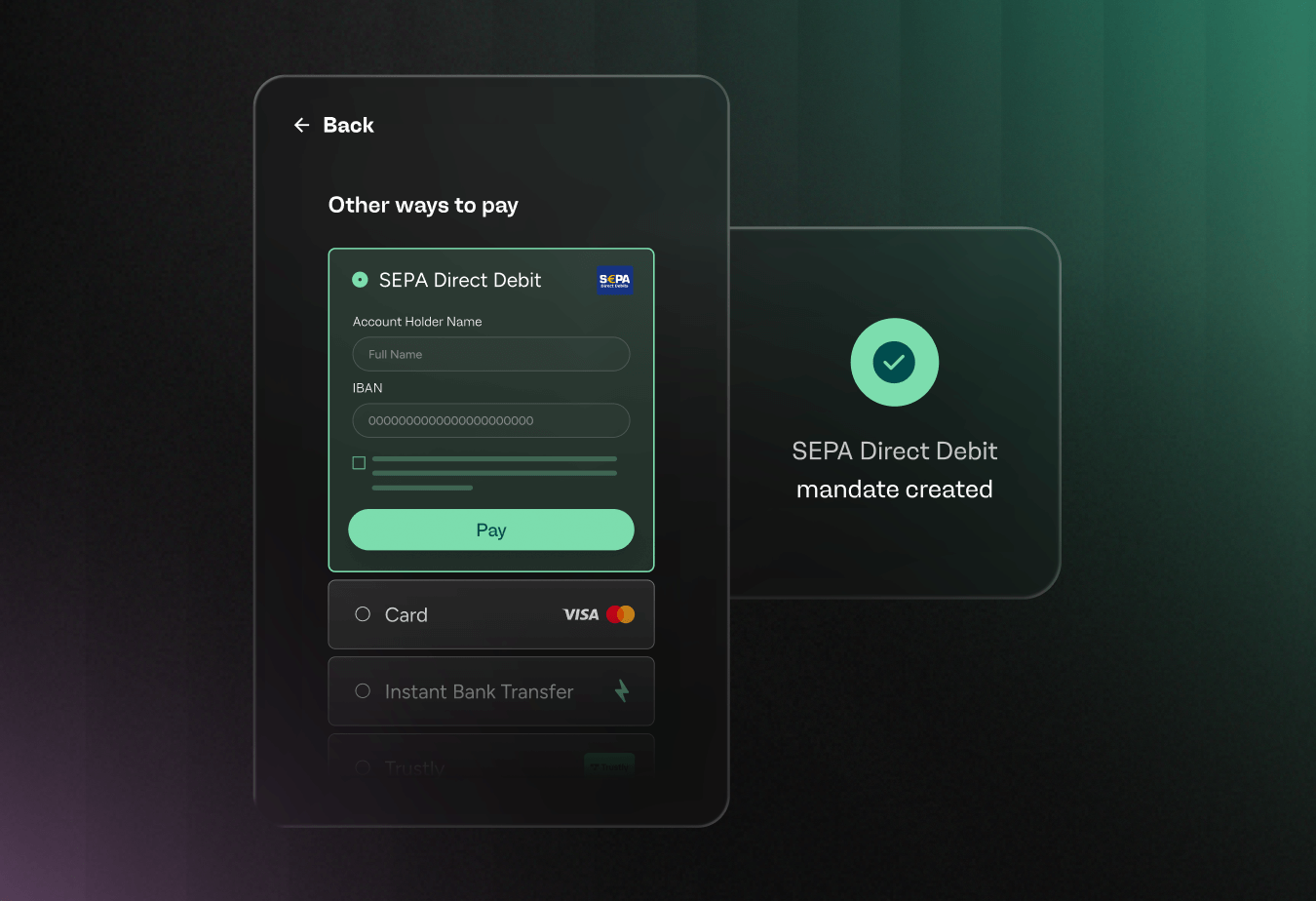
When you rely on one-off invoices, revenue feels unpredictable and admin work piles up fast.
This guide walks you through how to set up recurring payments step by step, from choosing a billing model to testing real transactions. You’ll learn how to automate charges, reduce errors, and create a smoother experience for the people who pay you each month.
You’ll also get practical tactics for encouraging customers to switch from manual transfers to simple, subscription-style plans. By the end, you’ll have a clear blueprint to protect cash flow, cut busywork, and give your merchants and teams more room to focus on growth.
At a glance: key benefits of recurring payments
- Predictable cash flow in every billing cycle
- Fewer late or missed payments
- Less manual work for finance and operations teams
What are recurring payments?
Recurring payments are charges that repeat on a regular schedule without manual action each time. A merchant and a payer agree on the timing in advance. The system then charges the payer automatically on that schedule. You accept payments in the same pattern every week, month, or year. This removes the need to chase each invoice one by one.
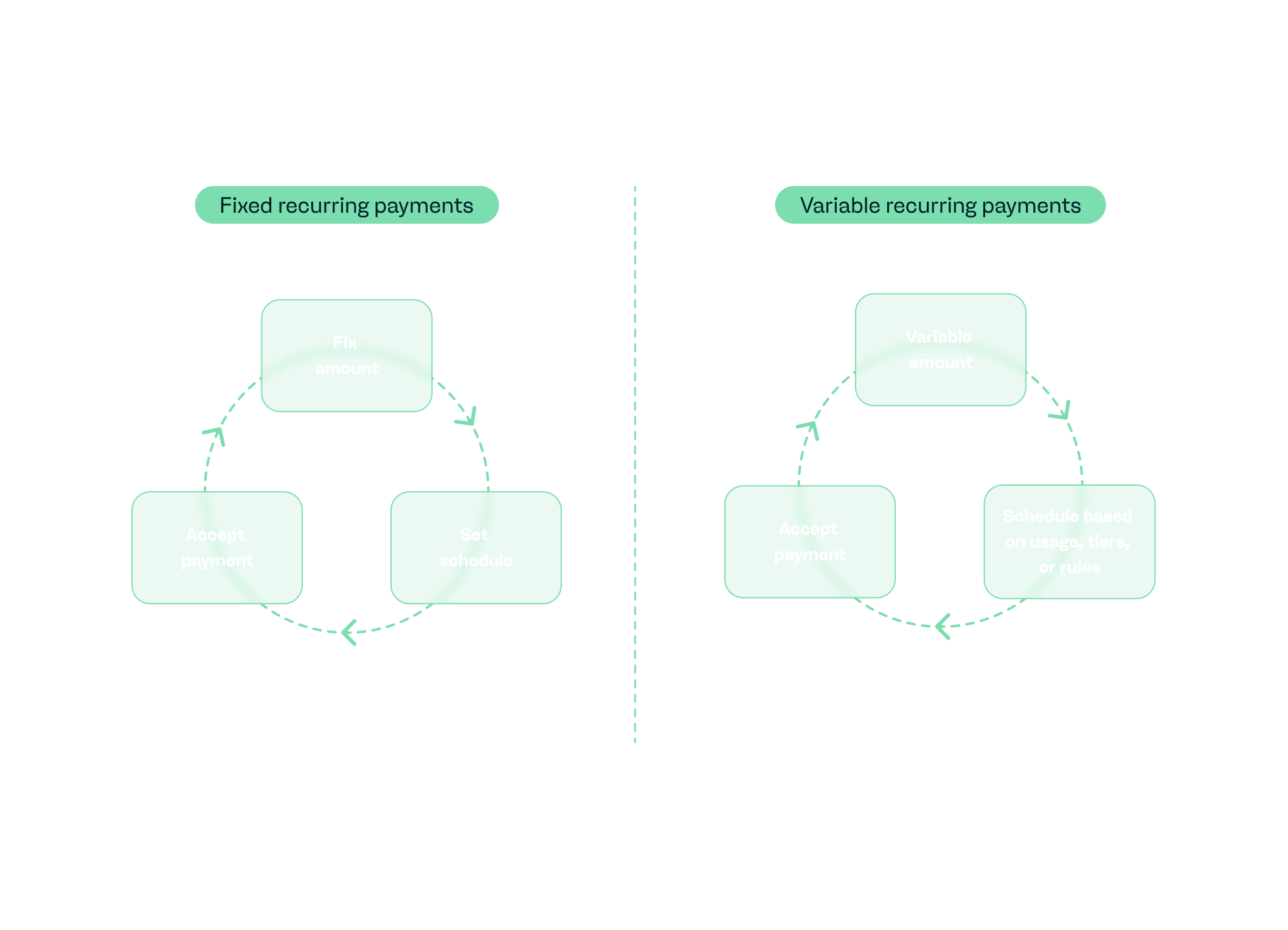
When you’re setting up recurring payments, you choose whether the amount stays the same or changes over time. Fixed recurring payments charge the same amount every cycle. Variable recurring payments change based on usage, tiers, or agreed rules. You can link these payments to an invoice, a credit or debit card, or a bank account. Each option suits different business models and payer preferences.
| Type | How it works | Typical use case |
| Fixed recurring payments | The same amount repeats on a set schedule | Subscriptions with a standard monthly fee |
| Variable recurring payments | The amount changes each cycle based on usage or other factors | Usage-based billing or metered services |
| Invoice-based payments | You send an invoice, then charge on the due date if approved | B2B services that still need formal invoices |
| Card or bank-on-file | You store a credit or debit card or bank details securely | Fast renewals and seamless online checkouts |
| Direct debit / ACH | You pull funds from a bank account on agreed dates | Larger or recurring invoices for trusted payers |
Why (and when) your business should use recurring billing
Recurring billing gives your business predictable cash flow. You know when funds will arrive as the payment schedule is set in advance. This clarity supports more accurate revenue forecasting. It also enables you to make better hiring, investment, and inventory decisions, as income arrives on a forecastable, recurring basis instead of variably.
Recurring billing also supports stronger relationships with your customers. People value not having to remember due dates or repeat the same checkout steps. A clear payment schedule paired with simple subscription payment methods removes friction from their experience. The easier it is to stay subscribed, the higher your retention rate over time.
Automation reduces manual tasks for your finance and operations teams. You save time on issuing invoices, chasing late payments, and posting entries by hand. Fewer touchpoints mean fewer human errors and disputes. Your team can focus on sales, analysis and strategy instead of repetitive admin work.
Recurring billing suits businesses that provide value on a repeat cycle. It fits subscription models, regular services, memberships, long-term contracts, and structured payment plans. It isn’t a strong fit for one-off purchases or highly variable usage where charges change dramatically from month to month. It also creates friction in markets with high churn where customers expect full flexibility and no ongoing commitment.
Choosing the right recurring payment setup for your business
There’s no single way to process recurring payments that fits every business. The right setup depends on your payment methods, buyers, and how flexible your billing needs are.
Payment method options: credit card, bank debit/ACH, invoice-based
Different payment methods create different experiences for buyers and teams. Credit cards suit online subscriptions and fast sign-ups. Bank debit or ACH supports lower fees and stable long-term relationships. Invoice-based flows fit B2B buyers who need approvals and purchase orders. You should compare costs, compliance needs, and friction before you choose a preferred payment method.
| Option | Pros | Cons |
| Credit card | Fast sign-up; familiar; supports online flows | Higher fees; card expiries; chargeback risk |
| Bank debit / ACH | Lower fees; stable for long-term relationships | Slower setup; mandates; not available in all regions |
| Invoice-based | Works with approval flows; clear documents for finance | More manual steps; higher late risk; weaker automation |
Billing frequency and flexibility
Billing frequency defines the schedule of your cash flow. You choose whether to bill weekly, monthly, annually, or on a custom interval. A merchant account should support these options without extra complexity.
Shorter cycles improve predictability, but can increase transaction counts. Longer cycles reduce fees but can make each scheduled payment feel bigger. You also need rules for upgrades, downgrades, and proration so changes stay fair. Add one-time setup fees and trial periods where they make sense. Keep these elements simple so buyers understand how you handle variable amounts over time.
Automation vs manual billing
You decide how much of your process you hand to a recurring payment service. Automatic billing uses stored details and charges cards or bank accounts on schedule. This mode suits subscriptions and steady service contracts.
Recurring invoices keep more control with the buyer but add extra steps for teams. Manual collections work for rare edge cases, but they don’t scale.
Credit card payments with auto-charge reduce friction but need strong retention and dunning rules. More manual modes fit high-touch deals or large, irregular projects. Aim for a recurring billing setup where automation covers most revenue, and manual work stays focused on exceptions.
How to set up recurring payments: step-by-step guide
Recurring revenue sounds simple. In reality, many teams juggle spreadsheets, manual reminders, and late payments. Most merchants start with the same question: how do I set up recurring payments? This section gives you a clear path from idea to live billing, moving you away from ad-hoc charges and toward a consistent, automated flow.
As you move through this section, you’ll see how each decision shapes your results. That view helps you connect the way you bill today with the structure your billing system needs for recurring charges. It also makes clear what to configure, what to integrate, and what to test before you scale.
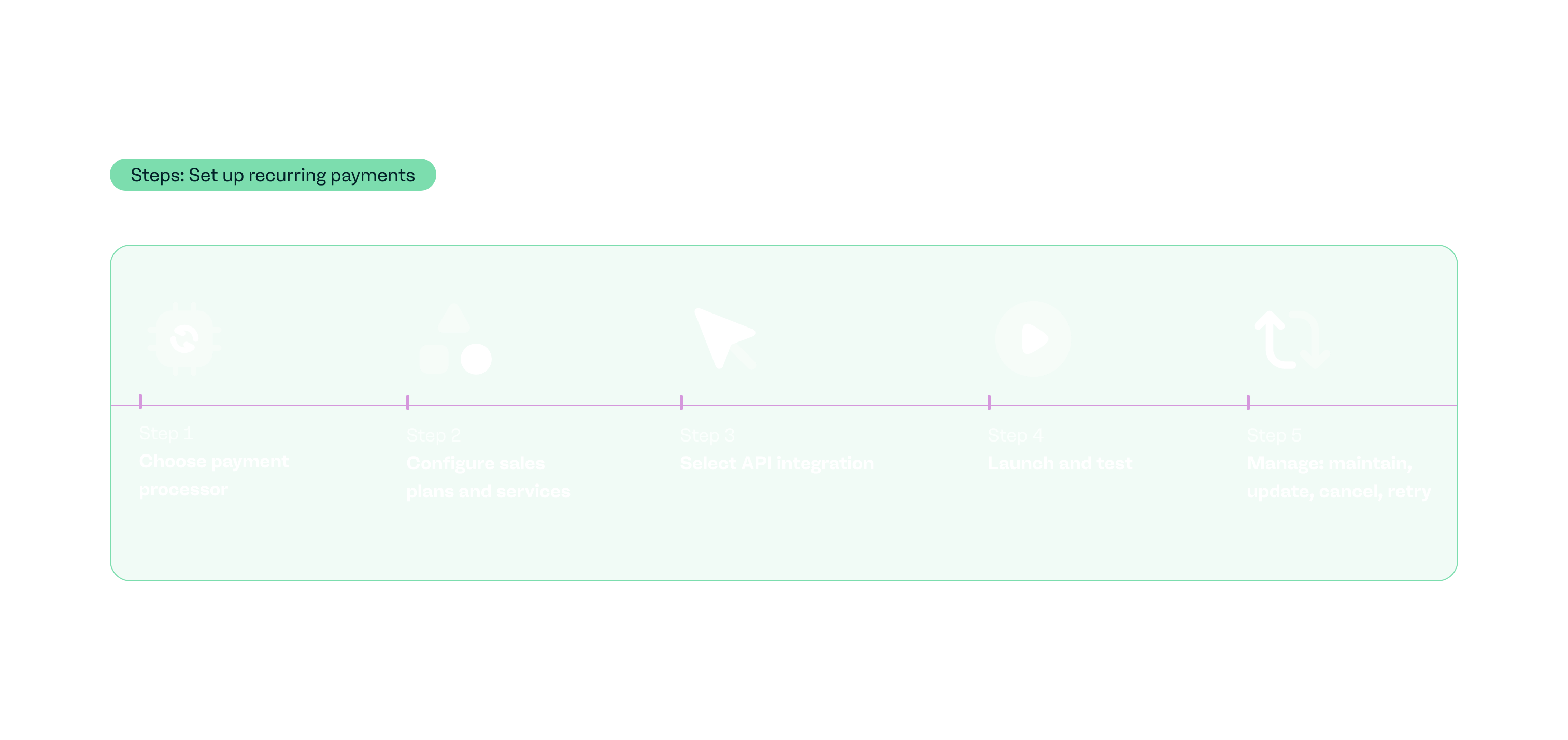
By the end of this part of the guide, you’ll know exactly how to set up recurring payments in a way that fits your business, your teams, and your payers.
Preliminary: Choose a payment processor
Your payment processor is the engine behind your recurring payments. With payabl., clear, transparent pricing is provided so you understand transaction fees, cross-border costs, and any add-ons before you scale. That makes it easier to model margins and choose the right mix of subscription offers.
Next, check supported payment methods. payabl. lets merchants accept payments from 300+ local and global methods, including cards, digital wallets, bank transfers - meaning recurring plans work across markets instead of in a single region. That flexibility matters if you bill on a recurring basis in more than one country.
Security and compliance should sit at the center of your decision. payabl. stores secure payment details using tokenisation, which replaces sensitive card information with a random number. It also operates as a regulated payment provider, which reduces the risk around card and bank data. That gives you a safer base for long-term subscriptions.
Look at how easily your teams can connect systems. payabl. offers APIs, webhooks, and ready-made integrations so you can link billing, storefront, and back office systems with a predictable setup. After set-up, the dashboard displays critical transaction and payout data in one place, which helps finance teams stay close to performance.
Configure plans and services
Start by defining what you’re actually selling on a recurring basis. Decide whether each offer is a subscription, a membership tier, a retainer, or a payment plan. Group your services into clear packages that match how people use them. This step turns “how to set up recurring payments for customers” from a vague idea into a concrete list of products your teams can work with. A structured catalog also makes it easier to report on performance later.
Next, set the commercial details for each plan. Choose a price point that reflects value, not just cost. Decide on billing frequency, such as monthly, quarterly, or yearly. Specify trial periods, setup fees, minimum commitments, and whether the plan is fixed term or ongoing. Secure discounts, upgrade paths, and tax settings so your billing terms stay consistent across regions and channels.
With payabl., you bring those decisions into a recurring payment solution that supports automated collections and subscription billing. You map each product or service to a plan with a defined price, currency, and billing cycle. The platform then supports manual initiation by merchants to run those charges on schedule, using stored payment details and your chosen billing terms.
API integration
An effective API is what turns a recurring payments setup from a concept into a working flow. A typical recurring-payments API should cover plan creation, subscription creation, payment methods, and the billing period or recurring schedule. It should expose endpoints to start and stop subscriptions, pause them, and store or update card or bank details. It also needs webhooks so your systems receive clear events for successful payments, failures, cancellations, and refunds. That’s how you move from “how to set up automatic payments” to a reliable, automated process.
With payabl., you integrate through APIs or a Web SDK to support customer transactions for recurring billing inside your own product. The API lets you attach tokens for cards or other methods and trigger charges on an agreed cycle. Webhooks send back status updates so you can manage recurring billing in your CRM, support tools, or internal dashboards. This keeps the core recurring payment solution in one place while your teams stay in control of the experience.
A simple API-driven flow for recurring payments might look like this:
- Create a plan using the API with an amount, currency, and chosen billing period or recurring schedule.
- Collect payment details through a secure form and tokenise them with payabl.
- Create a subscription object that links the payer, the plan, and the saved payment method.
- On each cycle, call the API or rely on scheduled runs to charge the subscription automatically.
- Receive webhooks for approved, declined, or cancelled payments and update your records.
- If a payment fails, trigger retries and notifications based on your dunning rules.
- When a user changes their plan or cancels, update the subscription via API and confirm the new status.
Launch and test
Before you go live, test your scheduling and payment flows vigorously. Start with low-value transactions so you can validate flows without adding risk. Run a mix of test cases for recurring payments for small business and larger setups. Include successful charges, hard declines, soft declines, and the flows you use to retry failed payments. This gives you a realistic view of how your automated recurring billing behaves under real conditions.
With payabl., you run these scenarios in a test environment first. Push through sample subscriptions that match your actual plans and billing terms. Test payment links ensuring proper functionality. This makes it easier to spot issues before real buyers start paying.
Next, focus on communication. Send test transactions through your customer journey and verify what the buyer sees at each step. Check checkout pages, confirmation screens, and email or SMS notifications. Confirm that receipts match the payment details and that branding stays consistent. Use this same path to test payment reminders and dunning messages so they’re clear, timely, and on-brand.
Finally, test how your internal systems respond. Make sure webhooks or reports update your CRM, accounting tools, and analytics in a predictable way. Confirm that support teams can see the same status your buyers see.
When your processes align, you can move from testing to launch with confidence that your recurring payments setup will behave as expected.
Manage recurring payments: maintain, update, cancel, retry
Once you go live, the real work is in how you manage recurring payments over time. Edit plans when a payer upgrades or downgrades. Pause a subscription if someone needs a short break. Cancel cleanly when a contract ends so you don’t keep charging by mistake. You also need a clear approach for failed payments. Set rules for retries that match your risk appetite and brand tone. Use dunning messages that explain what happened and how to fix it in simple language. Encourage payers to update payment information before the next charge date. With payabl., merchants track failed attempts, retry failed payments on a schedule, and prompt payers to refresh cards or bank details through secure flows.
Think about different payer types too. A business owner on a long-term contract expects a stable record of invoices and charges. An individual who asks how to set up automatic payments to a person needs transparency on timing and amounts.
Finally, keep reporting and support close to your recurring flows. Finance teams need clear exports for bookkeeping and reconciliation. Support teams need quick access to subscription status, recent charges, and upcoming billing dates. payabl. simplifies transaction visibility, so teams resolve questions faster and manage recurring payments inquiries with greater ease.
Best practices and legal/compliance considerations
Start with compliance and security
Follow PCI-DSS standards for any credit card recurring billing flow. Encrypt data in transit and at rest. Use tokenisation and secure storage instead of holding raw card or bank details. Get clear consent and share transparent billing terms, including how often you bill, the billing date, and your cancellation policy.
Handle data and privacy with care
Choose a reliable payment gateway. Limit who can access payment details. Document how you store and process any card or bank information. Keep privacy notices easy to find and written in plain language. Review local and cross-border rules if you work in more than one region.
Communicate in a way that builds trust
Send reminders or notifications before each billing cycle when it makes sense. Make cancellation simple, not hidden. Share invoices and receipts promptly. Offer self-service options or clear support paths so people can resolve issues quickly.
Plan for edge cases and accounting from day one
Define how you respond when payments fail, including retries, refunds, proration, and grace periods. Decide how you’ll handle upgrades, downgrades, and billing changes. Record recurring revenue in a consistent way. Set up recurring invoices where needed and reconcile payments in your accounting or ERP tools on a regular schedule.
Common mistakes and how to avoid them
Treating compliance and security as an afterthought. Every recurring payment plan should respect standards for data protection and secure storage. If you cut corners here, you add risk for both your business and anyone who pays you.
Limited or fragile payment options. If you only accept a single method, or don’t store a customer’s credit card securely, you create friction and drop-offs. Offer more than one way to pay and keep stored details protected with strong controls.
Communication gaps. Surprise charges, unclear billing dates, or hidden cancellation flows push people to leave. Clear reminders, simple explanations, and visible policies keep trust high and churn lower.
Skipping stress-testing their flows. That leads to failed payments, double billing, or broken links on day one. Test real scenarios before launch. Then design for growth so your systems can handle more subscribers, more changes, and more support requests without breaking.
Real-world examples and use cases
- A large fitness club moved membership dues to automatic monthly billing, making revenue more predictable and simplifying cash-flow planning for owners who now rely on recurring charges instead of manual renewals.
- Bambox, a baby essentials subscription box, grew to around $60,000 in monthly recurring revenue and more than 1,100 boxes shipped per month by using a subscription model with recurring payments instead of one-off purchases.
- Well-known SaaS brands such as Netflix, Dollar Shave Club, and Adobe Creative Cloud use subscription billing to generate predictable recurring revenue and layer in add-on services or tiers, turning ongoing access into a stable revenue engine.
- A tennis club that shifted memberships from annual renewals to direct debit recurring payments saw membership grow by 25%, with about a third of members on rolling monthly plans that renew automatically until cancelled.
Summary and next steps
Recurring billing gives you more predictable revenue, smoother cash flow, and less manual work. It also brings risks if you overlook security, skip testing, or create confusing billing experiences. Use this subscription payments setup guide as a reference when you design or refine your flow.
IMPORTANT: Before you commit, run a quick decision check
- Do you bill the same buyers on a regular schedule?
- Do they expect ongoing access to services?
- Do you have clear billing terms, support for refunds and changes, and a way to keep payment details secure?
If you answered yes to most of these, recurring payments are likely to be a good fit.
Next, review your current setup, your preferred payment gateway, and how invoices get paid automatically today. Identify which products or services are best suited to subscriptions or plans. Then start a small pilot with our recurring payment solution, measure results, and expand once you’re confident in the experience for your teams and your buyers.
Try payabl.’s recurring payments solution to turn your plans into predictable revenue. Talk to our team to design a setup that fits your business and the way your buyers pay.
Frequently asked questions (FAQ)
- What’s the difference between subscriptions and recurring payments? Subscriptions are a type of recurring payments where a payer gets ongoing access to a product or service for as long as they keep paying. Recurring payments is a broader term that covers any repeated charge on a schedule, including subscriptions, installment plans, retainers, and memberships.
- Do you need a business license to accept credit card payments? In most countries, you need to operate as a registered business to open a merchant account and accept card payments. The exact requirements vary by region, industry, and bank. Payment providers and acquiring banks usually run checks on your business status, ownership, and risk profile before they approve your account.
- Can billing be automated? Yes. You can automate billing by storing payment details securely and charging them on a set schedule. You can also automate retries, reminders, and many parts of reporting so teams spend less time on manual tasks.
- What is an example of a recurring payment? A monthly streaming subscription, a gym membership, or a software license that renews every year are all recurring payments. Each one charges the payer on a predictable schedule until they cancel or change their plan.